How to read a license plate in Rivian camera footage
Updated · by the Overlook team at CTT Apps (about us)
The plate is usually the one detail that turns footage into an outcome: it’s what an insurer or the police need to find the other driver. It’s also the detail most likely to be just out of reach. This guide covers how to give yourself the best chance of reading one, and how to tell when the footage simply doesn’t hold it.
Why plates are hard
A plate is small. A standard US plate is about 30 cm (12 inches) wide, and the characters are a few centimetres tall. The cameras are built to see everything around the car, not to zoom in on one thing, so a plate a few car lengths away covers only a small patch of the picture.
The drive recordings we’ve read are 1920 × 1536 pixels per camera. That sounds like plenty, but it’s spread across a wide view. Whether a plate is readable comes down to how many of those pixels land on it, and that falls quickly with distance: twice as far away, a plate covers a quarter of the pixels.
Then there’s movement and light. A car passing at speed smears across a frame, and at night a plate reflects headlights so brightly it can turn into a white rectangle.
1. Check every camera, not just the front
The obvious camera is often the wrong one. For a car that hit you from behind, the rear camera matters; for one that clipped you in a car park, the side camera nearest the damage may have the closest view, even though its wide-angle lens bends the picture. And the moment of contact is rarely the best moment for the plate: the other car is usually closest and slowest just before or just after.
In Overlook, every camera plays together, so you can watch the other car move from one camera’s view to the next and pick the camera where it comes closest. Switch to the focus layout (press G) to see one camera large.
| Situation | Try first | Then |
|---|---|---|
| Rear-ended, or someone reversed into you | Rear camera | Side cameras as the car pulls away |
| Door ding or scrape while parked | Side camera on the damaged side | Front or rear, as the car arrives or leaves the space |
| Hit-and-run while driving | Front camera, if it drove off ahead | Side cameras as it passed |
| Someone at the car on foot, who then drove off | Whichever camera faces their car | Later Gear Guard events, if they came back |
2. Step frame by frame
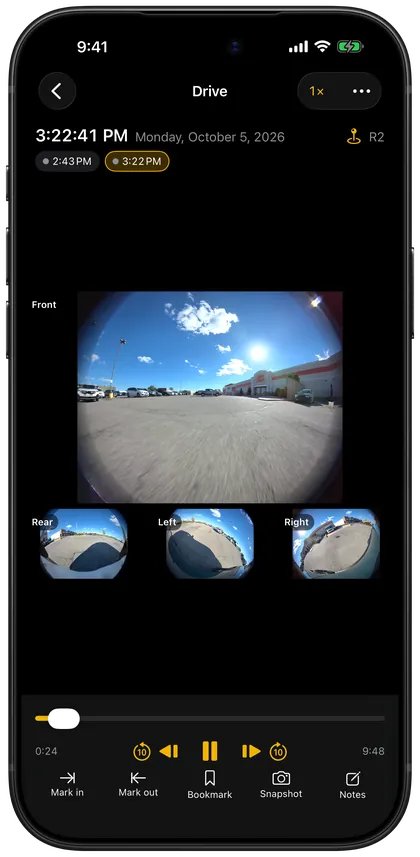
Normal playback blends motion together. Pause near the moment, then step one frame at a time: in Overlook, , goes back a frame and . goes forward. Watch the plate, not the car. At speed, a plate is often readable in one frame and smeared in the next, because the car’s motion and the camera’s exposure line up differently each time.
Slowing playback down ([ and ]) helps find roughly the right second first; stepping finds the frame.
3. Zoom, but know what zoom does
Scroll or pinch on a camera to zoom in, and drag to move around. Zooming makes the plate bigger on your screen, which helps your eyes, but it can’t add detail that the camera didn’t record. If the characters are a blur of a few pixels at full size, they’ll be a bigger blur zoomed in.
A few things that genuinely help:
- Look at several frames. Different frames blur different characters. Reading “7” in one frame and “K” in the next is how you assemble a plate.
- Step back from the screen. Oddly, a slightly smaller image is sometimes easier to read than a huge blocky one; your eyes average out the blockiness.
- Flat view for side cameras. The side cameras’ wide-angle lens stretches things near the edges. Overlook Pro’s fisheye correction shows a flat view you can look around in, which makes a plate near the edge look like a rectangle again.
4. Night, glare and weather
Plates are made to reflect light. At night, your car’s lights or theirs can make a plate so bright the characters vanish, while everything around it is dark. Try the frames where the plate is at an angle to the light, or further from it: as the car turns or moves, the glare often drops for a frame or two.
Rain, dirt and condensation on the camera lens soften everything. If you often park outside, wiping the cameras is the cheapest improvement you can make.
5. Don’t “enhance” it
AI upscaling and “enhance” tools are tempting, and they produce sharp-looking characters from a blur. The problem is that the characters are invented: the tool guesses what a plate probably looks like. It can produce a confident, wrong plate number, and an image like that is worthless as evidence and can point the police at an innocent driver.
Keep to what the original footage shows. If you can’t read it, say so, and give what you can.
6. Save what you found
When you find the best frame, take a snapshot. Overlook saves snapshots at the camera’s full resolution, not at the size on your screen, with the date and time, so a zoomed view doesn’t cost you detail. Save several frames if different ones show different characters, and note the time of each.
Keep the original files too. A snapshot is what you show people; the originals are what proves it. How to keep and prove the originals.
When you can’t read it
A partial plate is still useful. Police and insurers can often narrow a search with:
- the characters you’re sure of, and their positions (“starts 7K, last character 4”);
- the state or province, from the plate’s colours and design;
- the make, model, colour and any damage, stickers or roof racks;
- the exact time and place, which lets them check other cameras nearby.
Write down what you can see and how sure you are of each part. “Possibly a B or an 8” is honest and useful; a guess written as fact isn’t.
Troubleshooting and questions
Which Rivian camera is best for plates?
The one the other car comes closest to, and that’s often not the front. The side cameras see the widest area but stretch things at the edges; the front and rear cameras have less distortion. Check all of them.
Can Overlook read the plate for me?
No. Overlook helps you find the frame and see it clearly, but reading the plate is up to you. Automatic plate reading guesses, and a guessed plate is worse than none.
The plate is readable on my computer but not in the video I exported
A combined video compresses every camera together, which can soften small details. Use the snapshot from the original footage, or the original files, for the plate itself.
Should I post the footage to find the driver?
Give it to the police first. Posting a plate publicly can identify the wrong person or complicate a case. Reporting it to the police.
Can I use a plate to look someone up myself?
In most places, no: vehicle registration records are restricted, and the police or your insurer make that lookup. Give them the plate and let them follow it up.
Related guides
- Reporting a hit-and-run, break-in or vandalism to the police with Rivian footageWhat to do in the first hour, what to tell the police, and how to hand over the footage.
- Using Rivian camera footage for an insurance claim or police reportWhat to keep, how to show it was not edited, and how to send it.
- How to share Rivian camera footageSend a clip to a friend, a neighbor or an insurer without emailing huge files.